
P2P – ONE FTP LINK – TORRENT
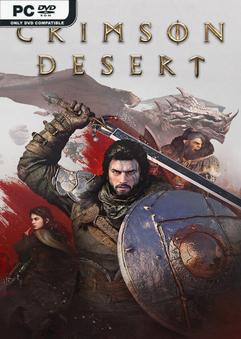
Crimson Desert is an open-world action-adventure set on the continent of Pywel….
DESCRIPTION / DOWNLOAD
ABOUT THE GAME
Crimson Desert is an open-world action-adventure set on the continent of Pywel. Join Kliff on his journey to rebuild the Greymane faction and to save the land from a looming threat. From vast wilderness and cities to ruins and the mysterious Abyss, forge your path through battles and discovery.
Title: Crimson Desert
Genre: Action, Adventure
Release Date: 19 Mar, 2026
Support the software developers. BUY IT!
• https://store.steampowered.com/app/3321460/Crimson_Desert/
2- Read the instructions and launch the game:
• Releases with a hypervisor require disabling some security features.
To prepare the system for the hypervisor, run VBS.cmd as administrator.
• Carefully read the displayed information before proceeding.
After you finish playing, it is strongly recommended to revert the changes.
• The hypervisor driver source code is located in the DenuvOwO_SRC.zip archive.
This archive is intended for advanced users — you do not need to open or copy it.
• Launch the game via steamclient_loader_x64.exe as administrator
(disable AutoLoadHV in DenuvOwO.ini if you want to load the hypervisor manually).
• If AutoLoadHV is enabled, the hypervisor will load automatically,
which requires administrator privileges, and will be unloaded via watchdog.exe.
• If AutoLoadHV is disabled, running the game as administrator will not be required.
In this case, you need to create and manage the driver service as shown below.
This information is intended for advanced users.
• The specified driver files are located in the DenuvOwO folder — provide your own path.
Use the following commands in a command prompt with administrator privileges:
sc create SimpleSvm type= kernel binPath= "C:\Users\Test\Desktop\SVM\SimpleSvm.sys"
(replace with your driver file path)
sc start SimpleSvm
sc stop SimpleSvm [after exiting the game]
sc delete SimpleSvm
• The driver name for Intel is hyperkd.sys. Other hyperdbg files should be located
(next to it). All these files start with "hyper".
• The file DenuvOwO.nfo (NotePad) contains the original instructions, if needed.
Crimson.Desert-DenuvOwO { Download | Download | Download | Download | Download | Download | Download }
Crimson Desert HYPERVISOR-P2P
Size: 124 GB
——————————-
ONE FTP LINK
1FICHIER
GOFILE
VIKINGFILES
MULTIUP
TORRENT
ANOTHER TORRENT
ANOTHER TORRENT
ANOTHER TORRENT
MAGNET LINK
Enjoy
SYSTEM REQUIREMENTS
-
MINIMUM:
- Requires a 64-bit processor and operating system
- OS: Windows 10 64-bit
- Processor: Ryzen 5 2600X / i5-8500
- Memory: 16 GB RAM
- Graphics: RX 5500 XT / GTX 1060
- DirectX: Version 12
- Storage: 150 GB available space
- Sound Card: Windows Compatible Audio Device
- Additional Notes: SSD required.
SCREENSHOTS


GAMEPLAY
INFO
1. Extract
2. Play!
COMMENTS
Leave a comment