
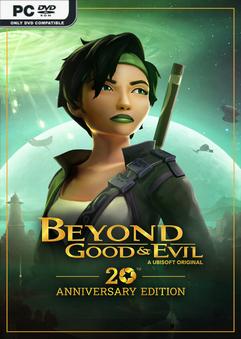
EMU – ONE FTP LINK – TORRENT
Armed with her precious daï-jo fighting stick and faithful camera, Jade’s adventure will….
DESCRIPTION / DOWNLOAD
ABOUT THE GAME
Armed with her precious daï-jo fighting stick and faithful camera, Jade’s adventure will get you to freely explore Hillys, combat creatures large and small, infiltrate dangerous areas, solve enigmatic puzzles, play addictive mini-games, race the best hovercraft pilots, and take pictures of the whole experience.
Title: Beyond Good & Evil – 20th Anniversary Edition
Genre: Action, Adventure
Release Date: 24 Jun, 2024
Support the software developers. BUY IT!
• https://store.steampowered.com/app/2556990/Beyond_Good__Evil__20th_Anniversary_Edition/
1- install game
2- Educate yourself first by reading _Info.txt and DenuvOwO.nfo; CPU virtualization
must be enabled in BIOS (some motherboards have it enabled as default setting)
3- Start as Administrator "VBS.cmd" from game folder, press 1, restart computer,
then on the next boot press F7 when new window will show up (driver signature OFF)
4- Start from desktop icon
PS: Once you make it work, any other game with Hypervisor can be installed and played from
desktop icon (as long as you don't restart/shutdown PC - then again VBS.cmd > 1 > reboot >
F7 > desktop icon)
Beyond Good and Evil 20th Anniversary Edition HYPERVISOR-P2P
Size: 11 GB
——————————-
ONE FTP LINK
MEGA
1FICHIER
GOFILE
ROOTZ
RANOZ
FILEMIRAGE
BOWFILE
SWISSTRANSFER
BUZZHEAVIER
FILEDITCH
UPLOADNOWIO
FILESDP
CHOMIKUJ
VIKINGFILE
DAYUPLOADS
DOWNMEDIALOAD
TURBOBIT
HITFILE
MULTI LINKS
TORRENT
Enjoy
SYSTEM REQUIREMENTS
-
MINIMUM:
- Requires a 64-bit processor and operating system
- OS: Windows 10 (64 bit only)
- Processor: Intel Core i5-4460, AMD Ryzen3 1200
- Memory: 8 GB RAM
- Graphics: NVIDIA GeForce GTX 960 (4GB VRAM) or AMD Radeon RX 5500 XT (4GB VRAM)
- DirectX: Version 11
- Storage: 20 GB available space
SCREENSHOTS


GAMEPLAY
INFO
1. Extract
2. Play!
COMMENTS
Leave a comment